
Structured logging for both halves of a Firebase app
npm install @dasasian/firebase-structured-loggerOne package for the frontend and the backend. MIT · 1.4.0, stable API · on npm and GitHub.
Crashlytics does not cover web
Section titled “Crashlytics does not cover web”Crashlytics reports crashes for native apps, and it has no web version. Almost every exception your web app throws is written to a console that you do not see. It happens on a device you do not own, in a browser you cannot reach, and it stays there until the tab is closed. So it is easy to run a web app and not know how often it breaks.
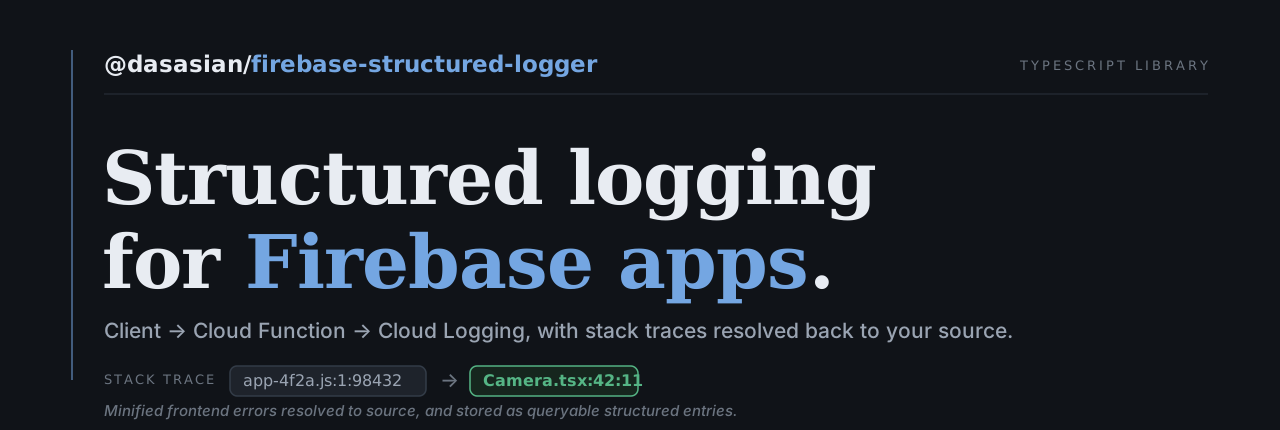
Getting the error off the device is half of it. A production stack points at app-4f2a.js:1:98432, a spot in a minified bundle nobody has read. fsl sends each error to a function you deploy, which resolves the stack against the source maps for that exact release. The trace reads Checkout.tsx:42:9, the file and line you wrote.
Logging stays out of your business logic
Section titled “Logging stays out of your business logic”Logging is an aspect of your app, not a part of each function. A function should read the same with it or without it. Here is one function, first with logging written by hand in a common shape, then with fsl.
async function applyDiscount( code: string, logger: Logger, context: LogContext,) { logger.info('apply discount', { ...context, code }) try { const total = await api.applyDiscount(code) logger.info('total recalculated', { ...context, total }) return total } catch (err) { logger.error('apply discount failed', { ...context, code, stack: err instanceof Error ? err.stack : String(err), }) throw err }}async function applyDiscount(code: string) { bc.action('apply_discount') return api.applyDiscount(code)}The function does its job and names the step. It takes no logger and no context, and it has no try and catch for the sake of a log.
If it fails, the error is logged where you handle it, or by the one handler you set at startup. The entry has the user, the screen, the release and the steps before it, this one included.
Say it once, where it happens
Section titled “Say it once, where it happens”You state each fact one time, in the place where it is true, and fsl puts it on every entry. You never pass context to a log call.
setupGlobalErrorHandler()Every uncaught error and unhandled rejection, logged with its stack resolved to your source.
enableNavigation()Each page change as a step in the trail. Every entry has the route, the page and the path.
logger.setUser(uid)The user on every entry from then on, until you call clearUser().
<div data-fsl-view="Attachment">Every entry written while the dialog is open says so. There is no open or close call to keep in step. It needs one enableViews() at startup.
withLogging({ functionName: 'checkout' }, handler)The function name and the caller’s verified user id on every entry the handler writes. Nothing carries over to the next request.
logger.error(err, { orderId })One entry with the order id you passed, and the user, screen, dialog, release, browser and last 50 steps that you did not.
One query, both halves
Section titled “One query, both halves”Frontend and backend write to the same stream in the same shape. One filter reads the whole story, in order:
labels.userId="<uid>"10:42:03.114 INFO screen=checkout click "Apply code"10:42:03.118 INFO screen=checkout applying discount SAVE2010:42:03.402 INFO fn=applyDiscount started10:42:03.611 ERROR fn=applyDiscount coupon lookup failed: timeout10:42:03.798 ERROR screen=checkout TypeError at Checkout.tsx:42:9Two of those came from a browser and three from a server, and you did not have to think about that. With a hosted error tracker, your client errors live in its database and your backend logs live in your cloud. To get this view you join two systems by timestamp.
They group into issues
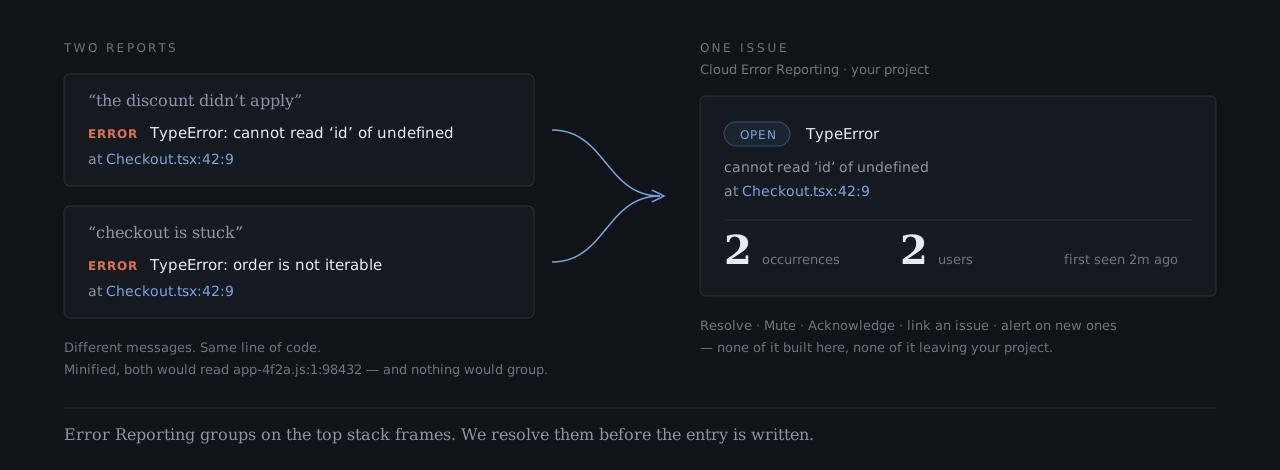
Section titled “They group into issues”Google Cloud already runs an error tracker in your project, at no cost beyond the logs. Error Reporting groups by exception type plus the five top-most stack frames, and in a web app those frames read app-4f2a.js:1:98432, so nothing ever groups. fsl resolves the frames before the entry is written, so two complaints from one line of code arrive as one issue. How it works →
Nothing leaves your project
Section titled “Nothing leaves your project”Every entry, every breadcrumb, every screenshot stays in the Google Cloud project you already own, under your own IAM and your own retention rules. No third party receives it or stores it, and there is no data-processing agreement to negotiate, because there is no processor. If you are in health, finance, education, or anywhere a contract names where data may live, this can decide which tool you are allowed to use.
This is a hard problem
Section titled “This is a hard problem”Labels in the wrong place cannot be filtered
Section titled “Labels in the wrong place cannot be filtered”Entry labels have to be emitted under logging.googleapis.com/labels. Anywhere else, the logs look correct and labels.appId="…" matches nothing. Labels and filters →
One request’s user leaks into the next
Section titled “One request’s user leaks into the next”AsyncLocalStorage.enterWith() never unwinds. On a warm instance, the next handler inherits whichever user came before, and every line names the wrong person. Cloud Functions →
Source maps left in dist/ are your source code, published
Section titled “Source maps left in dist/ are your source code, published”Uploading them is the easy half. Deleting them from the build output, so hosting cannot serve them, is the half that is easy to miss. Source maps →
An old stack resolves against the new release
Section titled “An old stack resolves against the new release”A stack that names a bundle which still exists resolves against whatever maps are deployed now. The line numbers are wrong, and no error tells you. Source maps →
An unknown severity destroys the entry
Section titled “An unknown severity destroys the entry”A value outside the fixed list throws inside the write. The entry is lost with no message, and it also gets past the severity floor. Troubleshooting →
A trailing slash is a different object
Section titled “A trailing slash is a different object”fsl//r7/app.js.map is not fsl/r7/app.js.map. Cloud Storage does not collapse the double slash, so a slash typed out of habit splits the writer from the reader. Source maps →
A rate limit checked in two places counts twice
Section titled “A rate limit checked in two places counts twice”An error checked against the budget in two layers is also counted in both. A limit set to 50 then works as a limit of 25. Rate limits →
The client library hides the grouping
Section titled “The client library hides the grouping”Read errorGroups through the Node client library and the field is absent, though the REST API returns it. It then looks as if nothing grouped. How it works →
Every one of those is handled here, and each has a test that fails if it comes back. The list is not finished. It grows each time this runs against something real, and we are still finding these and fixing them. Logging code that you write yourself gets a fix only when you find the problem yourself.
What’s in it
Section titled “What’s in it”What it isn’t
Section titled “What it isn’t”The grouping is Google’s Error Reporting, running in your project. We make its input legible. We do not build or run it. There is no assignment, no ownership, no dashboard of ours. What exists is Google’s console, plus whatever queries you write.
There are hosted error trackers that do all of that, and do it well. What you give up here is a polished product: no vendor UI, no onboarding flow, no support contract. What you get is every frontend and backend event in a project you already own: one stream, one query language, grouped by a console that came with it, and nobody else holding a copy.
Under it
Section titled “Under it”- Built with. TypeScript, source-map symbolication (@jridgewell/trace-mapping), Cloud Storage for the maps, and ULID for ids. Firebase packages are optional peers, and it runs without any of them.
- Entry points.
/clientfor the browser,/functionsfor the backend,/testingfor your tests, and anfslcommand. See the Browser API, the Backend API and the CLI. - Backend. Cloud Functions, Cloud Run, or any Node server on Google Cloud, with or without Firebase. It writes to stdout, so it has to run where Google collects stdout into Cloud Logging. Cloud Functions → · Cloud Run →
- Pairs with. firebase-mcp-server, when the agent reading the logs also needs the Firestore data they point at.
- License. MIT
Who wrote this
Section titled “Who wrote this”We are Dasasian, and this came out of shipping Firebase apps and getting tired of frontend errors that could not be read. Each item on the hard-problems list took us an afternoon to find, and then it became a test. We build products and take on selected client work. If that is useful to you, write to hello@dasasian.com.
Made by Dasasian