
Browser errors in Cloud Error Reporting
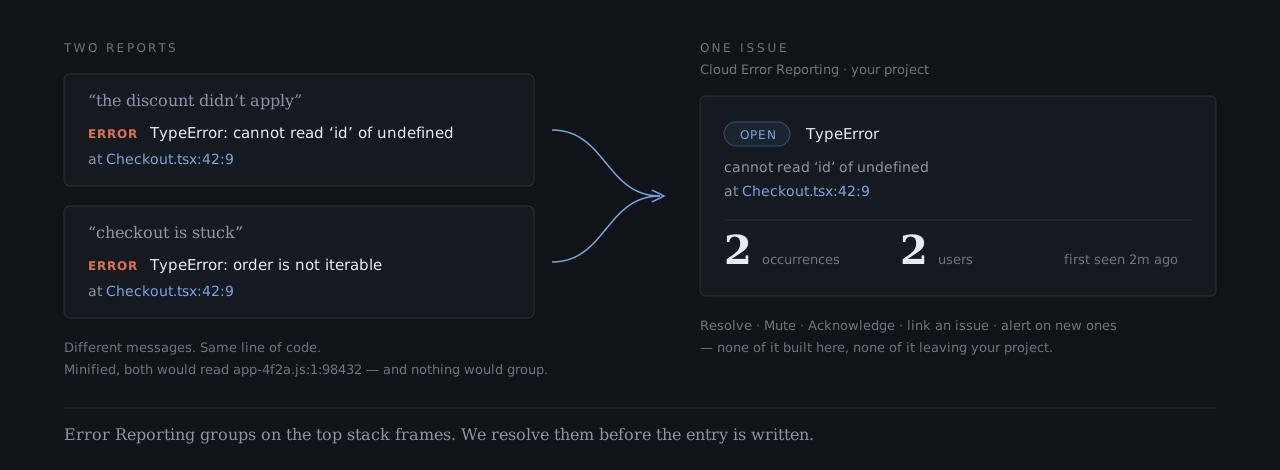
Two different messages from one line of Checkout.tsx become one issue, with a count, a resolution state and a notification.
Cloud Error Reporting builds its issues from entries in Cloud Logging. A browser cannot write to Cloud Logging, and a minified browser stack never groups, so JavaScript errors from your frontend do not show up there by default. Google’s Error Reporting documentation covers server languages and has no page on browser errors.
fsl closes both gaps. The browser sends each error to a function in your own project, the function resolves the stack against your source maps, and then it writes the entry. Error Reporting sees a stack it can group.
Why browser errors do not arrive
Section titled “Why browser errors do not arrive”A browser has no credentials for Cloud Logging, and you would not ship any. So the frontend needs a door: a function in your project that accepts the error and writes it on the browser’s behalf. With fsl that door is logFrontendEvent, a Cloud Function in the deploy you already run. On Cloud Run or another Node server, the door is an HTTP handler. See Cloud Run.
Browser
No credentials
No source maps
Your Cloud Functions
logFrontendEvent()
Credentials and maps
Cloud Logging
Your project
One stream
Why minified stacks never group
Section titled “Why minified stacks never group”Error Reporting groups by exception type plus the five top-most stack frames. In a production bundle those frames read app-4f2a.js:1:98432. They change every release, and no two crashes look alike, so every error becomes its own issue or none are recognised at all.
The browser must not hold your source maps, and Cloud Logging cannot apply them. The log function is the only place that can, because every frontend error already passes through it. It resolves the frames before the entry is written, so they read Checkout.tsx:42:9. Two different messages from that one line become one issue:
Backend logs take the short path
Section titled “Backend logs take the short path”Your backend already runs where Google collects output. So the backend logger writes each entry to standard output, and Google collects it into Cloud Logging. No function sits in between.
Both halves write the same shape, with the same labels. One filter, such as labels.userId="<uid>", reads the browser entries and the backend entries together, in order. Cloud Functions and Cloud Run cover the backend setup.
What you get in the console
Section titled “What you get in the console”Error Reporting is Google’s product, running in your project. It collapses repeats into issues and gives you:
- Occurrence counts and affected users.
- A resolution state: Open, Acknowledged, Resolved or Muted.
- Notifications on new errors.
- A field to link your own issue tracker.
It costs nothing beyond the logs you already write, and nothing leaves your project. fsl does not build or run any of it. It makes the input legible.
To read the grouping from your own code, use the Cloud Logging REST API. The Node client library, @google-cloud/logging, leaves the errorGroups field out of the entries it returns, so a check written with it concludes that nothing grouped.
Entries at ERROR and above have a stack_trace and a serviceContext naming your appId and release, which is all Error Reporting needs. You do not have to enable it. Warnings and user feedback stay out of it, because an issue is something a person has to resolve and neither is a bug.
Set it up
Section titled “Set it up”The setup is a client logger, a log function, and a deploy step that uploads source maps. Get started walks through all four steps, ending with a test error. It shows in the Logs Explorer, and as a new issue in the Error Reporting console. Source maps covers release ids and what the upload does.
For errors a framework catches before window sees them, add React or Vue handling, or those render errors never reach the log function.
Made by Dasasian